PDF files are one of the most reliable formats for sharing documents because they preserve the original layout across different devices and operating systems. However, there are many situations where keeping multiple PDF files separate can make them difficult to organize, share, or manage.
Whether you’re combining invoices, reports, contracts, presentations, scanned documents, or application forms, merging several PDF files into a single document helps keep everything organized and easier to access. Instead of sending multiple attachments, you can create one professional PDF that’s simple to store, print, and share.
The good news is that you don’t need expensive software like Adobe Acrobat to combine PDF documents. Today, you can merge PDF files online using secure browser based tools that work on Windows, macOS, Linux, Android, and iPhone without installing any software.
In this guide, you’ll learn how to merge PDF files online without losing quality, arrange pages in the correct order, avoid common mistakes, and create one professional document in just a few simple steps.
Quick Answer
You can merge PDF files online by uploading multiple PDF documents to a trusted PDF merger, arranging them in the correct order, clicking the merge button, and downloading the combined file. Most online PDF merger tools preserve the original formatting and quality while allowing you to combine documents securely without installing additional software.
Merge PDF Tasks at a Glance
| Task | Available Online | Difficulty |
|---|---|---|
| Upload Multiple PDFs | ✅ Yes | Easy |
| Rearrange PDF Order | ✅ Yes | Easy |
| Merge PDF Files | ✅ Yes | Easy |
| Combine Scanned PDFs | ✅ Yes | Easy |
| Merge Password Free PDFs | ✅ Yes | Easy |
| Preview Before Merging | ✅ Yes | Easy |
| Download Combined PDF | ✅ Yes | Easy |
Table of Contents
- What Does It Mean to Merge PDF Files?
- Why Should You Merge PDF Files?
- How to Merge PDF Files Online
- Common Uses for Merging PDFs
- Can Merging PDFs Reduce Quality?
- Online PDF Merger vs Desktop Software
- Common PDF Merging Problems
- Tips for Merging PDFs Safely
- Frequently Asked Questions
- Conclusion
What Does It Mean to Merge PDF Files?
Merging PDF files means combining two or more separate PDF documents into one complete file while preserving the original formatting, text, images, and page layout. Instead of managing several individual documents, you create a single PDF that is easier to organize, share, print, and archive.
Many professionals, students, and businesses merge PDFs to keep related documents together. For example, you can combine contracts, invoices, presentations, reports, certificates, resumes, or scanned pages into one organized file.
Modern online PDF merger tools make this process simple by allowing you to upload multiple documents, arrange their order, and create a single PDF within seconds.
Why Should You Merge PDF Files?
Combining multiple PDF documents offers several practical benefits for both personal and professional use.
Some of the most common advantages include:
- Keep related documents organized.
- Send one attachment instead of multiple files.
- Create professional reports and presentations.
- Combine scanned pages into a single document.
- Simplify document management.
- Make printing easier.
- Improve file organization for business records.
- Save time when sharing documents.
Whether you’re preparing business reports, school assignments, legal paperwork, or client documents, merging PDF files helps create a cleaner and more professional final document.
Why Use an Online PDF Merger Instead of Desktop Software?
Online PDF merger tools have become the preferred choice for many users because they are fast, convenient, and accessible from almost any device.
Unlike traditional desktop software, browser based PDF merger tools don’t require installation or software updates. Simply upload your files, arrange them in the correct order, merge them, and download the finished document.
Most online PDF merger tools also support:
- Windows
- macOS
- Linux
- Android
- iPhone and iPad
This flexibility makes it easy to merge PDF files wherever you are, whether you’re working from the office, home, or while traveling.
How to Merge PDF Files Online
Merging PDF files online is a simple process that usually takes only a few minutes. Most online PDF merger tools work directly in your browser, allowing you to combine multiple documents without downloading or installing software.
Follow these step by step instructions to merge your PDF files safely and efficiently.
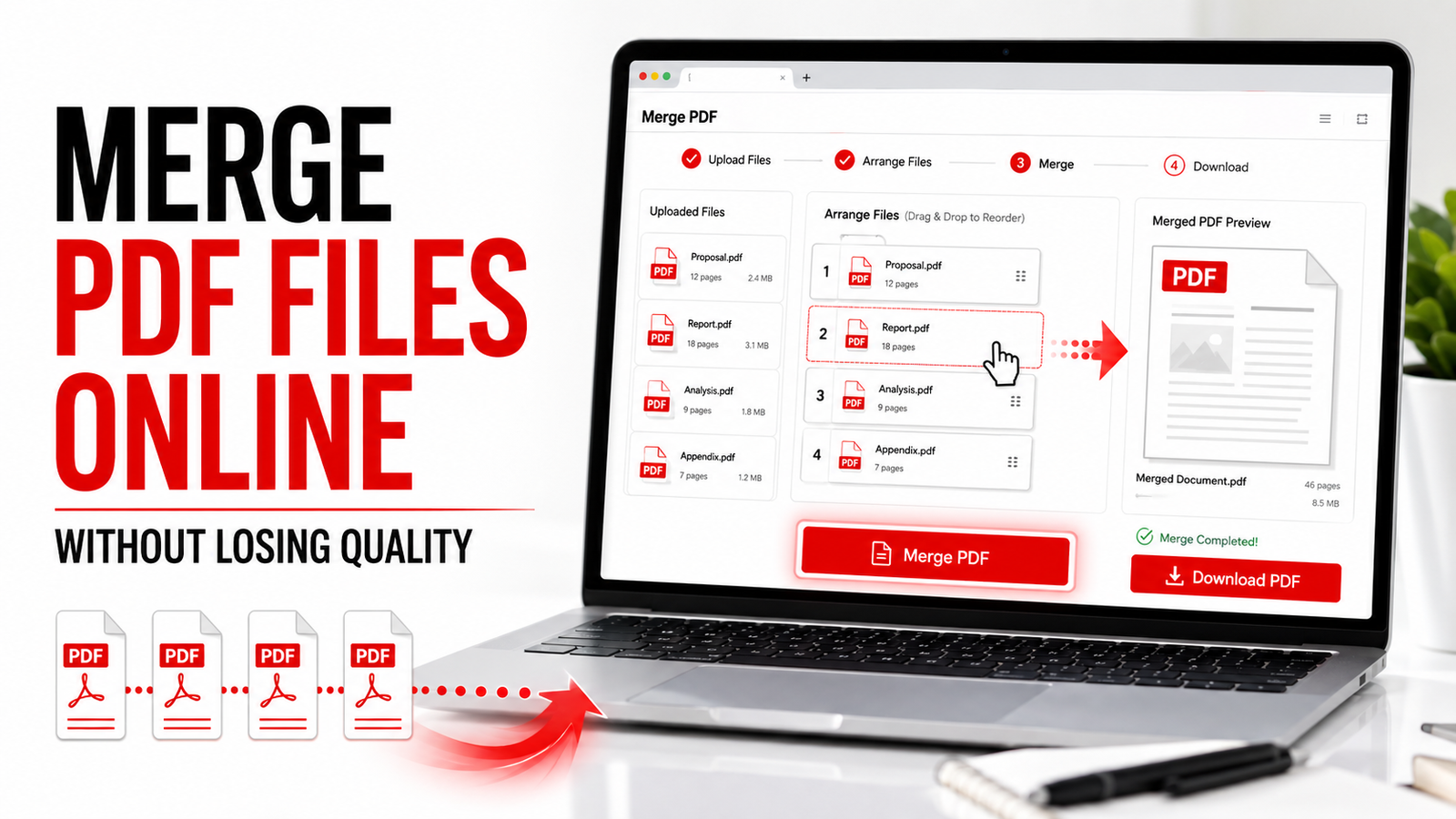
Step 1: Upload Your PDF Files
Open a trusted online PDF merger and upload all the PDF documents you want to combine.
Most tools allow you to:
- Drag and drop PDF files.
- Upload files from your computer.
- Import PDFs from cloud storage.
- Select multiple files at once.
Wait until all files are uploaded before moving to the next step.
Step 2: Arrange the PDF Files in the Correct Order
After uploading your files, organize them in the order you want them to appear in the final document.
For example:
- Cover Page
- Introduction
- Main Report
- Supporting Documents
- Appendix
Most online PDF merger tools let you drag and drop files to rearrange them quickly.
Taking a few extra moments to organize your files now will save time later and ensure your final PDF is easy to read.
Step 3: Merge the PDF Files
Once the files are arranged correctly, click the Merge PDF button.
The tool will combine all uploaded documents into a single PDF while preserving:
- Text formatting
- Images
- Tables
- Graphics
- Fonts
- Original page quality
The merging process usually takes only a few seconds, depending on the size and number of files.
Step 4: Download the Combined PDF
When the process is complete, download the newly merged PDF to your device.
Many online PDF tools also allow you to:
- Save the file to cloud storage.
- Share the document using a secure link.
- Continue editing the merged PDF.
- Compress the PDF to reduce file size.
Always open the final document and review every page before sharing it with others.
Common Uses for Merging PDF Files
People merge PDF documents for many personal, educational, and professional reasons.
Some of the most common uses include:
- Combining invoices into one monthly report.
- Joining scanned pages into a single document.
- Creating complete project reports.
- Merging resumes with supporting certificates.
- Combining contracts and agreements.
- Organizing legal documents.
- Preparing business presentations.
- Creating digital portfolios.
- Combining school assignments.
- Organizing research papers.
Using one organized PDF instead of multiple separate files makes sharing and document management much easier.
Can Merging PDF Files Reduce Quality?
One of the most common concerns is whether merging PDF files affects their quality.
In most cases, the answer is no.
A high quality online PDF merger combines documents without changing the original formatting, text, images, or page layout. The merged file should look the same as the original documents, only combined into a single PDF.
However, quality may be affected if:
- The original PDF files are already low quality.
- Images inside the PDFs are compressed.
- The merger tool applies automatic compression.
- The documents contain unsupported fonts.
Using a reliable PDF merger helps preserve the original quality of your documents.
Online PDF Merger vs Desktop Software
Both online and desktop PDF tools can combine documents, but each option has different advantages.
| Feature | Online PDF Merger | Desktop Software |
|---|---|---|
| Free Version | ✅ Yes | Limited |
| No Installation Required | ✅ Yes | ❌ No |
| Works in Browser | ✅ Yes | ❌ No |
| Merge Multiple PDFs | ✅ Yes | ✅ Yes |
| Rearrange Files | ✅ Yes | ✅ Yes |
| Works on Mobile Devices | ✅ Yes | Limited |
| Easy for Beginners | ✅ Yes | Moderate |
| Automatic Updates | ✅ Yes | ❌ No |
For most users, an online PDF merger provides the quickest and most convenient solution without requiring software installation.
Why Use an Online PDF Merger?
Online PDF merger tools offer several advantages over traditional desktop applications.
Some of the biggest benefits include:
- No software installation required.
- Access from any device.
- Fast document processing.
- Simple drag and drop interface.
- Easy file organization.
- Secure document handling.
- Convenient cloud integration.
- Beginner friendly interface.
Whether you’re working from home, the office, or while traveling, an online PDF merger allows you to combine documents quickly and efficiently.
Common PDF Merging Problems and How to Fix Them
Although merging PDF files is usually straightforward, you may occasionally run into problems. Fortunately, most issues can be resolved quickly by following a few simple steps.
The PDF Files Won’t Upload
Large file sizes, slow internet connections, or unsupported file formats can prevent PDFs from uploading successfully.
How to fix it:
- Check your internet connection.
- Make sure the files are in PDF format.
- Reduce the file size if necessary.
- Refresh the page and try again.
The Pages Are in the Wrong Order
One of the most common mistakes is merging documents before arranging them correctly.
How to fix it:
Use the drag and drop feature to organize the PDF files in the correct sequence before clicking the merge button.
The Merged PDF Is Too Large
Combining several large PDFs can create a file that’s difficult to email or upload.
How to fix it:
After merging the documents, use a PDF Compression Tool to reduce the file size while maintaining good quality.
Password Protected PDFs Cannot Be Merged
Some PDF documents are protected against editing or merging.
How to fix it:
If you have permission, unlock the PDF before merging it with other files.
The PDF Looks Different After Merging
Occasionally, fonts or images may appear slightly different if the original files contain unsupported elements.
How to fix it:
Use high quality source files and a reliable PDF merger that preserves the original formatting.
Tips for Merging PDF Files Safely
Following a few best practices helps protect your documents while ensuring the best results.
- Use a trusted online PDF merger.
- Review the page order before merging.
- Keep a backup of the original PDF files.
- Remove unnecessary pages before combining documents.
- Compress large PDFs after merging if needed.
- Avoid uploading confidential documents to unknown websites.
- Download and review the final PDF before sharing it.
These simple habits help keep your documents secure, organized, and professional.
Frequently Asked Questions
Is it safe to merge PDF files online?
Yes. Most trusted online PDF merger tools use secure file encryption and automatically delete uploaded documents after processing to help protect your privacy.
Can I merge PDF files for free?
Yes. Many online PDF merger tools allow you to combine multiple PDF documents free of charge without installing any software.
Will merging PDF files reduce quality?
No. A reliable PDF merger preserves the original text, images, formatting, and page layout while combining multiple documents into one file.
Can I merge scanned PDF documents?
Yes. Scanned PDF files can usually be merged just like standard PDF documents.
How many PDF files can I merge at once?
The number depends on the online PDF merger you use. Many tools support merging multiple files in a single session.
Can I rearrange pages before merging?
Yes. Most online PDF merger tools let you drag and drop files or pages into the correct order before creating the final document.
Can I merge PDFs on my phone?
Yes. Browser based PDF merger tools work on Android phones, iPhones, tablets, laptops, and desktop computers.
Key Takeaways
- Merging PDF files helps organize multiple documents into one file.
- Online PDF merger tools are fast, secure, and easy to use.
- Arrange your documents before merging for the best results.
- High quality PDF merger tools preserve formatting and document quality.
- Compress the merged PDF if you need a smaller file for sharing.
- Always review the final document before sending or printing it.
Conclusion
Merging PDF files online is one of the easiest ways to organize documents without sacrificing quality. Whether you’re combining reports, contracts, invoices, presentations, scanned pages, or application forms, an online PDF merger saves time and keeps your files organized.
With a reliable browser based PDF merger, you can upload multiple documents, arrange them in the correct order, combine them into a single PDF, and download the finished file within minutes. There’s no need to install software or purchase expensive desktop applications.
If you’re looking for a fast, secure, and free way to combine PDF documents, PDF Mentor makes the process simple. Upload your files, merge them in seconds, and download one professionally organized PDF that’s ready to share, print, or archive.
Related PDF Tools
You may also find these free PDF tools helpful:
PDF Mentor helps you merge PDF files online quickly while preserving the original quality and page order.